Mobile RTS with classic tactics and a modern mobile shell
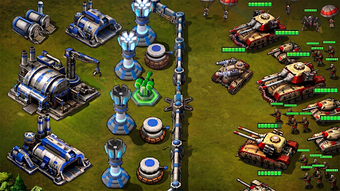
Red Command - War Alert RTS from TINYSOFT - slots slot machines casino games is a mobile real-time strategy title that casts the player as a battlefield commander opposing a rising red threat. The app centers on tactical decision-making, base construction, and unit management in real-time skirmishes across a single-player campaign. It pairs a campaign-driven progression with competitive elements and is aimed at players who appreciate classic RTS design adapted for Android play.
What kind of RTS experience does Red Command deliver?
Red Command channels the feel of late 90s and early 2000s PC strategy through a nostalgia-tinted presentation and mission structure, placing the player in a modern conflict scenario. The game stages mission-based encounters that reward careful planning over reckless assaults. The setting uses a blue versus red visual motif and a campaign that steps players through increasingly demanding scenarios.
Does it offer meaningful units and progression mechanics?
The app exposes a varied roster and a layered upgrade path, letting commanders tune forces for specific roles. Unit types include infantry, heavy tanks, and support vehicles. A detailed upgrade framework applies to both individual units and the commanding generals, adding persistent growth to tactical skirmishes and introducing long-term choices about specialization.
How does the mobile control and presentation perform in play?
The control scheme is adapted for touch, designed to permit precise unit selection and positioning during live engagements. Visuals draw on retro RTS styling rather than photorealism, and the audio supports frontline action without flashy production. The game requires a modern Android release for best performance, which aligns with its real-time demands on input and rendering.
What keeps players returning and who benefits most?
Replayability rests on mission variety, the general upgrade system, and leaderboards that let players compare results globally. Competitive progression gives skirmishes a meta layer while the campaign provides structured scenarios. Strategy fans seeking measured, tactical battles benefit most; the game rewards players who enjoy experimenting with unit mixes and long-term commander builds.
An inviting tactical choice for classic-RTS fans
Red Command is a welcoming pick for mobile players who favor deliberate, squad-level tactics and persistent unit development. The game shows clear appeal to those who want a handheld approximation of classic PC strategy, though its design choices reflect a mobile-first background and may suit players who accept mobile pacing and optional in-app upgrades. It is best for players ready to invest in methodical, mission-focused play.
Pros
Nostalgic visual style echoing classic RTS titles
Varied unit roster: infantry, heavy tanks, and support vehicles
Persistent general and unit upgrade system adds long-term goals
Mobile touch controls designed for precise unit management
Cons
Requires a modern Android release for optimal performance
Optional in-app purchases affect upgrade pacing
Developer previously specialised in social casino titles, a different design background
Loading…
About permissions
Before downloading, you can take a quick look at the permissions this app may request on your device. App permissions allow certain features to work properly, such as accessing your camera to take photos, your location for maps, or your storage to save files.
In this section, you’ll find a clear and simple overview of the types of permissions the app uses, grouped by their level of sensitivity, along with a visual breakdown to help you understand them at a glance. This way, you can see how the app interacts with your device and decide to download with confidence.
Permissions types
Standard
86%
Sensitive
14%
Permissions distribution
Privacy
43%
Data collected
29%
Data shared
29%
Data safety info
Privacy
3 permissions
Permissions that allow the app to access personal or sensitive information stored on your device, such as location, contacts, camera, or microphone.
android.permission.VIBRATE
Standard
android.permission.WAKE_LOCK
Standard
android.permission.FOREGROUND_SERVICE
Standard
Data collected
2 permissions
Information the app may gather from your device or usage activity to enable features, personalize content, and improve overall performance.
android.permission.ACCESS_NETWORK_STATE
Standard
android.permission.ACCESS_WIFI_STATE
Standard
Data shared
2 permissions
Information that may be shared with trusted third parties to provide services, support app functionality, or deliver relevant content.
android.permission.INTERNET
Standard
android.permission.POST_NOTIFICATIONS
Sensitive
This report summarises the permissions declared by the app at the time of scanning and groups them into Privacy, Data collected and Data shared. A declared permission shows what the app can access, it does not necessarily mean personal data is collected or transmitted. For full details check the app’s privacy policy and the developer’s clarifications shown below. Softonic generates this report automatically from the package metadata; it is informational and not a substitute for a full security or privacy audit.
Laws concerning the use of this software vary from country to country. We do not encourage or condone the use of this program if it is in violation of these laws. Softonic may receive a referral fee if you click or buy any of the products featured here.